Audio setup
Open Preferences and select Microphone in the Audio section. Adjust Gain and configure Shot threshold in Detection. Save your changes. Set Refractory under Session settings on the target page before recording. This interval prevents repeated registration of one sound event.
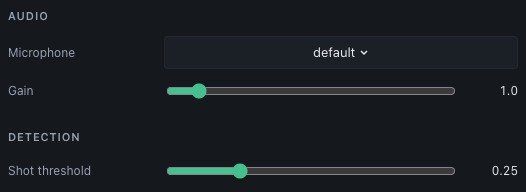
Check that a deliberate shot sound registers once and that ordinary background noise does not register. Raise the threshold if unrelated sounds trigger shots. Lower it or increase gain if shots are missed. Recheck after changing microphone position or the room environment.
The session’s Pre-shot, Post-shot and Release window settings control the trace intervals used for shot review. Camera and audio measurements share a monotonic time base in the controller.
Real microphone input requires the desktop application with system backends. Synthetic devices and the browser mock cannot verify microphone sensitivity, latency or permissions on your machine.