Preferences
Dropdowns use the app theme. Use the arrow keys to move through options, Enter to select and Escape to close the menu.
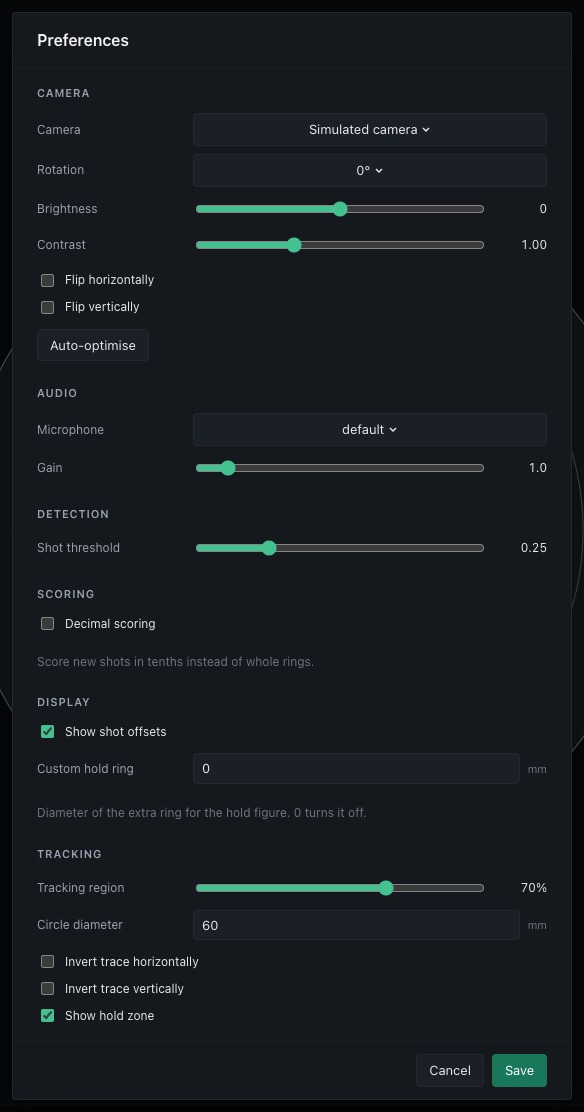
Open Preferences using the cog at the bottom of the navigation rail, below About. Changes are edited in a draft. Save to apply them or cancel to leave the saved preferences in place.
- Camera: camera selection, rotation, brightness, contrast and flips. Preview commands support camera and image adjustments. Auto-optimise requests detector tuning and reports its status.
- Audio: microphone and gain.
- Detection: shot threshold.
- Scoring: optional decimal scoring for new shots.
- Display: show or hide shot offsets in the shot list.
- Tracking: tracking region, measured circle diameter and display toggles.
Pre-shot, post-shot, release window, refractory interval, target face, shot diameter, shooting position and shots per series belong to each session. Configure them in New session or under Session settings on an idle target page with no shots. They are saved with the session and restored when it is opened. New sessions start with the standard defaults.
The tracking circle diameter sets the measurement scale. The target face and shot diameter set scoring geometry. They serve different purposes.
Real-device settings are stored in the platform application data directory:
%APPDATA%/ShotTrainer on Windows, ~/Library/Application Support/ShotTrainer
on macOS, and $XDG_DATA_HOME/shottrainer on Linux (default
~/.local/share/shottrainer). The controller uses settings.json,
detector_settings.json, zero_offset.json, camera_selection.json and
custom_target_faces.json, alongside sessions.db. Back up this directory
before editing files manually. Synthetic mode uses a separate temporary
directory.
Decimal scoring
Enable Decimal scoring under Scoring to score new shots in tenths
rather than whole rings. It is off by default and saved globally in
settings.json as decimal_scoring. Creating a session keeps this preference.
A standard ten-ring target scores up to 10.9. Each ring is divided into ten radial zones using the target geometry and shot diameter. Custom faces with numeric labels use the same interpolation. An X ring supplies the ten only when the face has no numeric ten. Faces with non-numeric labels retain those labels.
Changing this preference does not rewrite saved scores. Reopened sessions show the scores recorded with their shots.
Shot offsets
Show shot offsets under Display controls the offset column in the shot
list. It is on by default and saved globally as show_shot_offsets. Each
positioned shot has an arrow pointing towards the target centre. Centred shots
and unavailable positions have no arrow. Hiding offsets also hides these
arrows. The printed shot sheet keeps its offsets.
Custom hold ring
Custom hold ring under Display sets the diameter in millimetres of the
extra ring used for the hold figure around the average aim point. It is saved
globally as custom_hold_ring_mm. The default of 0 turns the figure off.